Refer to the exhibit.
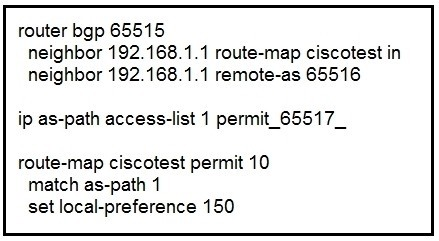
After troubleshooting BGP traffic steering issue, which action did the network operator take to achieve the correct effect of this configuration?
Show answer and explanation
Correct answer: A
300-510 Online Practice Questions
279 questions available · Page 1 of 28
Updated Exam DumpsVerified AnswersPass Guarantee
Refer to the exhibit.
After troubleshooting BGP traffic steering issue, which action did the network operator take to achieve the correct effect of this configuration?
Correct answer: A
The ISP_A network is configured with PIMv2 in sparse mode. The engineering team at ISP_A must implement multicast support following RFC 5059 in the network. The RP priority will be 0, and the solution must require limited supervision from the operations team.
Which action must the team take to meet the requirements?
Correct answer: C
Which expression, when used with the as-path-set command, matches the AS path attribute of the route?
Correct answer: C
A network engineer recently deployed a wireless network for users at a new office to join video conferences wirelessly. The existing network consists of routers that are configured for EIGRP and BGP, which are located at several data centers in different physical locations. The engineer configured PIM-SSM within a single domain from a single source. However, during the testing phase, the video conference failed to work for any of the users. The IPs are reachable and firewalls in the network are configured correctly to allow the traffic.
Which action resolves the issue?
Correct answer: C
Refer to the exhibit.
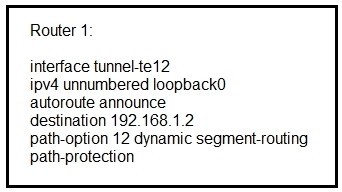
Router 1 has established an SR-TE tunnel with router 2.
Which statement describes this configuration?
Correct answer: C
Refer to the exhibit.
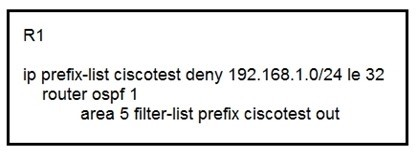
An engineer applied the configuration on R1 to prevent network 192.168.1.0/24 from being propagated outside of area 5. After the change, users have reported they are not able to access any of the application servers that were working before. While checking the routing table of the peer router, the engineer notices R1 stopped propagating any routes outside area 5.
Which action must be taken to fix the problem?
Correct answer: B
What is a requirement of PIM-SM?
Correct answer: D
Refer to the exhibit.
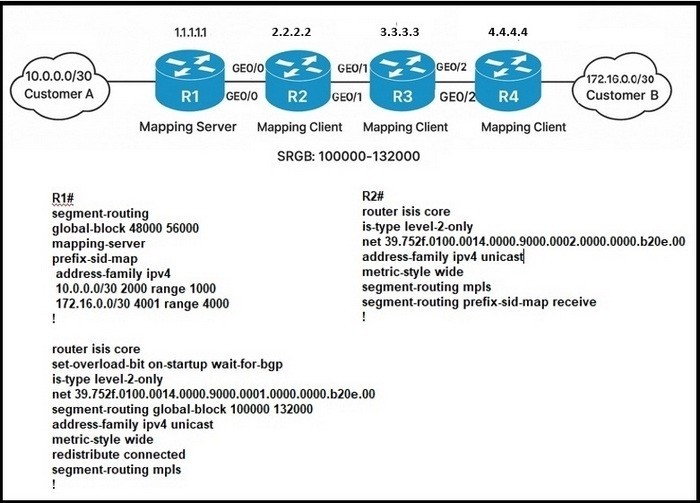
Customer A and customer B are connecting through a service provider network with these requirements.
R1 acts as the mapping server to connect 10 0 0.0/30 and 172.16.0.0/30 networks.
R1 and R2 are using nondefault SRG8 range to allocate SID.
R2 ads as the mapping client for transient traffic originating from customer A.
Which configuration meets the requirements?
Correct answer: B
Refer to the exhibit.
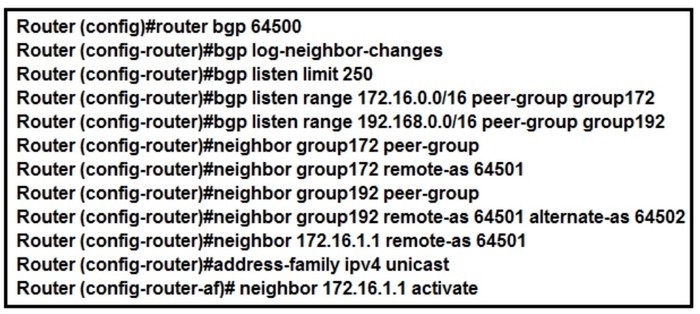
After creating dynamic neighbors for the range specified, the network administrator with an employee ID: 4698:80:283 cannot see all the BGP neighbors established.
What is the issue?
Correct answer: C
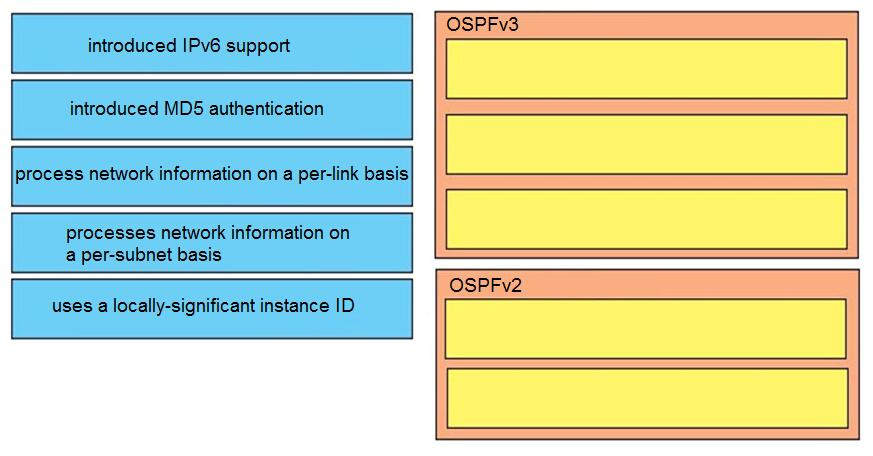
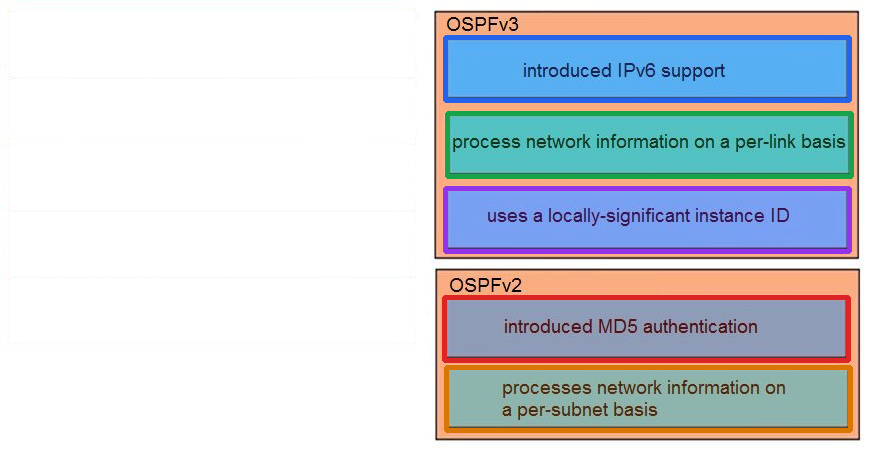
DRAG DROP
Compare different features between OSPFv2 and OSPFv3. Drag and drop the descriptions of OSPF from the left onto the correct OSPF versions on the right.